
Effortless S3 Auditing in AWS: Automate with Lambda and SNS
Using Terraform to Create S3 Buckets, SNS Topic, and Lambda for Auditing Bucket Objects
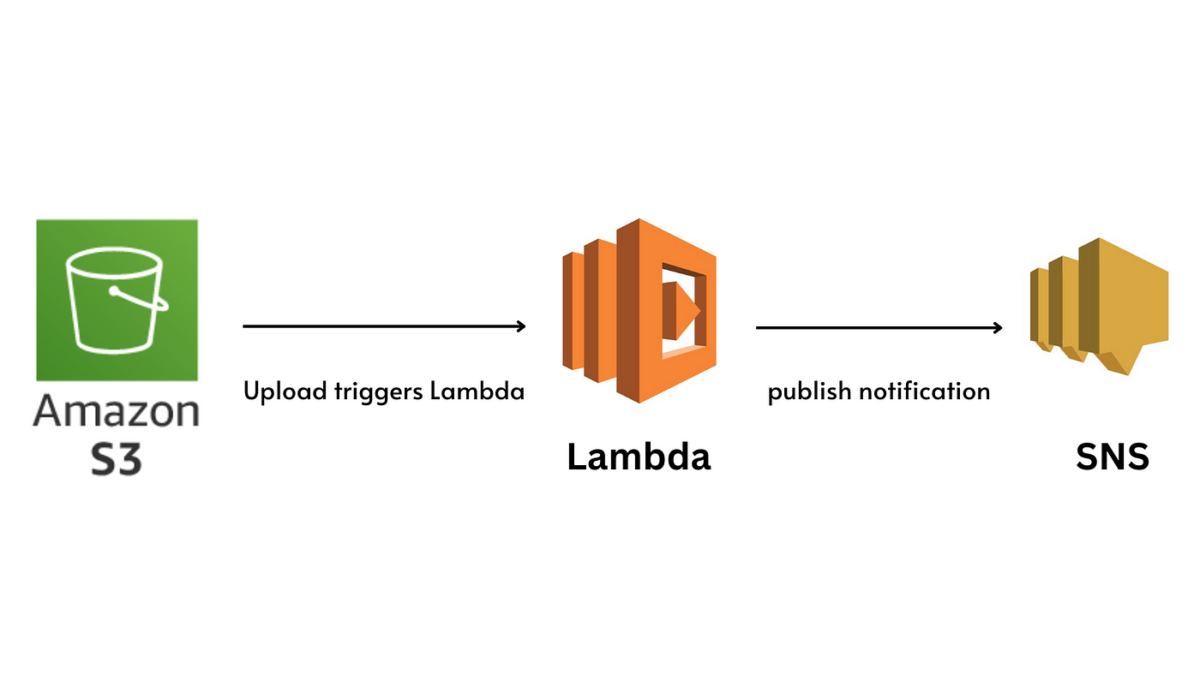
In this article, we will walk through how to use Terraform to create two Amazon S3 buckets, an SNS topic, and a Lambda function that audits objects from one bucket and writes the result to another. The flow of this architecture is as follows:
- Create two S3 buckets: One will store the files, and the other will store the audit results.
- Create an SNS topic: The first S3 bucket will trigger this topic whenever a change occurs.
- Create a Lambda function: The Lambda will be triggered by the SNS topic and will audit the objects in the first bucket, then write the results to the second bucket.
We’ll go through each part of the configuration, including the Terraform code to set up the infrastructure, and the Lambda function code that processes the bucket objects.
Step 1: Terraform Configuration to Create S3 Buckets, SNS Topic, and Lambda
1.1. Terraform Provider Configuration
Make sure your Terraform provider is set to use AWS.
provider "aws" {
  region = "us-east-1"
}
1.2. Create S3 Buckets
First, create the two S3 buckets. One will hold the files to be audited, and the other will hold the audit log.
resource "aws_s3_bucket" "source_bucket" {
  bucket = "source-bucket-example-terraform"
}

resource "aws_s3_bucket" "destination_bucket" {
  bucket = "destination-bucket-example-terraform"
}
1.3. Create SNS Topic
Next, create an SNS topic that will be used as a trigger for the Lambda function. This topic will receive notifications when there are events in the source S3 bucket.
resource "aws_sns_topic" "bucket_event_topic" {
  name = "bucket-event-topic"
}
1.4. Create the Lambda Execution Role
The Lambda function will need permissions to interact with S3 and SNS. Create an IAM role for this purpose.
resource "aws_iam_role" "lambda_execution_role" {
  name = "lambda_execution_role"

  assume_role_policy = jsonencode({
    Version = "2012-10-17"
    Statement = [{
      Action = "sts:AssumeRole"
      Principal = {
        Service = "lambda.amazonaws.com"
      }
      Effect = "Allow"
      Sid    = ""
    }]
  })
}

resource "aws_iam_policy" "lambda_policy" {
  name        = "lambda-s3-sns-policy"
  description = "Lambda policy to access S3 and SNS"

  policy = jsonencode({
    Version = "2012-10-17"
    Statement = [
      {
        Action = [
          "s3:ListBucket",
          "s3:GetObject",
          "s3:PutObject"
        ]
        Resource = [
          aws_s3_bucket.source_bucket.arn,
          aws_s3_bucket.source_bucket.arn + "/*",
          aws_s3_bucket.destination_bucket.arn,
          aws_s3_bucket.destination_bucket.arn + "/*"
        ]
        Effect = "Allow"
      },
      {
        Action   = "sns:Publish"
        Resource = aws_sns_topic.bucket_event_topic.arn
        Effect   = "Allow"
      }
    ]
  })
}

resource "aws_iam_role_policy_attachment" "lambda_policy_attachment" {
  policy_arn = aws_iam_policy.lambda_policy.arn
  role       = aws_iam_role.lambda_execution_role.name
}
1.5. Create the Lambda Function
Now, let’s create the Lambda function itself. The Lambda will listen to the SNS topic, process the S3 bucket data, and write the audit logs to the destination bucket.
resource "aws_lambda_function" "bucket_audit_lambda" {
  filename         = "lambda_function.zip"
  function_name    = "bucket_audit_lambda"
  role             = aws_iam_role.lambda_execution_role.arn
  handler          = "lambda_function.lambda_handler"
  runtime          = "python3.9"
  source_code_hash = filebase64sha256("lambda_function.zip")

  environment {
    variables = {
      SOURCE_BUCKET      = aws_s3_bucket.source_bucket.bucket
      DESTINATION_BUCKET = aws_s3_bucket.destination_bucket.bucket
    }
  }
}
Note: You need to zip your Lambda code (lambda_function.zip) and upload it to the Lambda function. We’ll define the Lambda code in the next section.
1.6. Create the SNS Topic Subscription
Finally, link the SNS topic to the Lambda function. This ensures that when the SNS topic is triggered, it invokes the Lambda function.
resource "aws_sns_topic_subscription" "lambda_subscription" {
  protocol = "lambda"
  endpoint = aws_lambda_function.bucket_audit_lambda.arn
  topic    = aws_sns_topic.bucket_event_topic.arn
}
1.7. Set S3 Bucket Notification
You need to set up a notification configuration for the source S3 bucket to send events to the SNS topic.
resource "aws_s3_bucket_notification" "source_bucket_notification" {
  bucket = aws_s3_bucket.source_bucket.id

  topic {
    topic_arn = aws_sns_topic.bucket_event_topic.arn
    events    = ["s3:ObjectCreated:*", "s3:ObjectRemoved:*"]
  }
}
Step 2: Lambda Function Code
Now, let’s look at the Lambda function code. It will audit the objects in the source bucket and save the audit information to the destination bucket.
Here’s the provided Lambda code with minor improvements:
import boto3
import json

s3 = boto3.client('s3')

def lambda_handler(event, context):
    instances = []

    # Parse the SNS message
    s3_event = json.loads(event['Records'][0]['Sns']['Message'])
    bucket = s3_event['Records'][0]['s3']['bucket']['name']

    # Get objects at the root level
    root_level = s3.list_objects_v2(Bucket=bucket, Delimiter='/')

    # Iterate over the prefixes (subfolders) at each level
    for prefix in root_level.get('CommonPrefixes', list()):
        branch_level = s3.list_objects_v2(Bucket=bucket, Prefix=prefix['Prefix'], Delimiter='/')
        for subfolder in branch_level.get('CommonPrefixes', list()):
            version_level = s3.list_objects_v2(Bucket=bucket, Prefix=subfolder['Prefix'], Delimiter='/')
            for project in version_level.get('CommonPrefixes', list()):
                instances.append(project.get('Prefix', ''))

    # Create JSON object for audit
    json_object = {
        'instances': instances
    }

    # Upload the audit log to the destination bucket
    s3.put_object(
      Body=json.dumps(json_object),
      Bucket='<destination-bucket>',
      Key='react/instances.json'
    )
Make sure to replace the <destination-bucket> placeholder with the actual name of the second S3 bucket in your environment.
Step 3: Zip the Lambda Function
- Save the Python code to a file named
lambda_function.py. - Create a ZIP file:
zip lambda_function.zip lambda_function.py
Step 4: Deploy the Terraform Configuration
After setting up the Terraform configuration and Lambda code, you can deploy everything using Terraform:
terraform init
terraform apply
Conclusion
This setup will trigger the Lambda function every time an object is created or removed in the first S3 bucket. The Lambda function processes the structure of the first bucket, audits the objects, and stores the results as a JSON file in the second bucket. The flow of data goes from the S3 bucket to SNS, then to Lambda, and finally to the destination S3 bucket.
This solution is fully automated using Terraform, and you can modify it according to your specific needs, such as adding more granular permissions or adding additional processing to the Lambda function.
